The #1 remote viewing technique.
What you'll learn
1 / 7
Introduction
CRV is the most common Remote Viewing technique. Before continuing, make sure you have finished the “Remote Viewing” lesson, since all the rules apply to CRV as well.
CRV is “controlled”, since the viewer is always in control. The session is done in normal conscious state, with the pen and paper and eyes opened.
Core task of CRV is capturing the raw signal from the subconscious mind and differentiating it from the noise, such as guessing, imagination, distractions…
It consists of several stages. First 3 stages are the basic ones and will be covered in this lesson.
Each stage can process more detailed information that the previous stages. Stage 1 describes the basic aspects of the target - called “gestalts”, while advanced stages can define relationships between people, their feelings, exact dimensions of objects and so on.
Each stage has some tasks done by the analytical part of the brain, so it doesn’t interfere with the subconscious signal.
AOL
Analytical overlay happens when your analytical mind tries to figure out what the target is. For example, for perception “tall building”, AOL might be “Eiffel Tower”. When this happens, at the side of the paper write AOL followed by the overlay. Put down your pen, breathe out, pick it up and continue.
2 / 7
Target Coordinates
CRV was initially called “Coordinate Remote Viewing”.
The viewer needs to be blind to the target, as per Remote Viewing protocol. So how does the viewer know what to “view”?
Coordinates! Each target is given a coordinate - random characters that represent the target, such as “A322” or “1425 / 2298”.
While CRV was developing, they used real geographical coordinates of the target, but very soon realized that the coordinates can be any set of numbers or letters!
Every CRV session starts with target coordinates and that is all the viewer needs. No more information should be given, as per Remote Viewing protocol.
So, how does that work? How can the viewer perceive anything based just on some random number? Well… No one really knows for sure. But it works! :)
3 / 7
Cooldown
Before starting a session it is a good idea to relax and clear your mind. This is called cooldown. It is not mandatory, but can help.
Also very useful is picking a right time and place for CRV. You should have a clear intent that you want to describe the target and there should be no distractions around you. Put your phone to silent mode.
Some people do a small ritual before they begin.
Pat Price, an extremely successful Remote Viewer, loved to clean his glasses before the session, so he can “see better”, even though CRV has nothing to do with seeing. :)
Others like putting on their lucky clothes.
Paul H. Smith, one of the US Army’s remote viewers, used to listen to heavy metal music to clear his mind before the session!
In any case, clear your mind, relax and go to Stage 1 when you are ready.
4 / 7
Stage 1
CRV session starts with writing down the target coordinates and immediately after drawing an ideogram.
Ideogram
This is a small squiggle drawn by your subconscious mind. You should not think about it. It represents the gestalts of the target. Process of writing down coordinates and the ideogram is usually repeated 3 times.
As it turns out, most people draw the same ideograms for the same gestalts. For example, land would be drawn as a straight line, manmade usually has a sharp angle, water has waves and so on.
After the ideogram, you need to write down “A” and “B” parts.
A
Describe the ideogram line and how hard does it feel. For example: up, across, down. Soft.
B
Your first analytical response. What do you think it is? It should be from subconscious, so don’t actually try to think about it and identify it. For beginners, this is usually in the form of a gestalt. So, B part can for example be - structure.
Here is an example of the Stage 1.
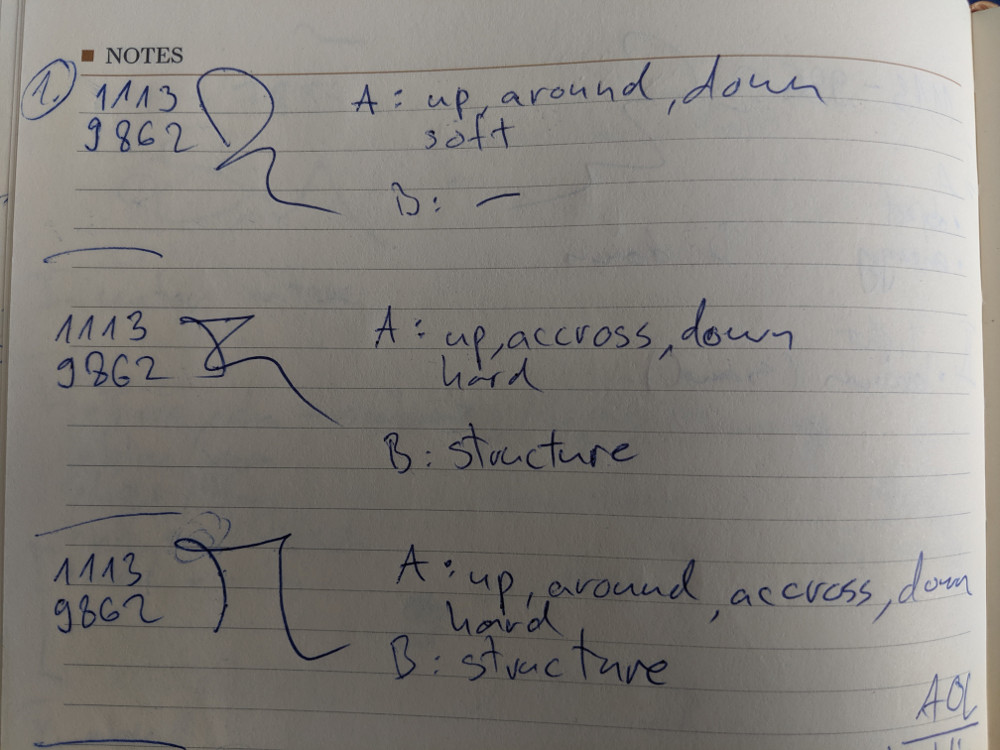
Stage 1 describes the basic aspects of the target. Now it’s time to get into more details.
5 / 7
Stage 2
Stage 2 is all about sensory data. Even though you don’t actually perceive with your real senses in Remote Viewing, it does feel as if you are. In this stage, you will perceive colors, smells, temperature, sound, taste, textures, dimensions.
Sometimes, you will see a flash of red color, or a smell of fresh grass, for example. Other times, you will just “know” there is blue there. It’s very subtle and requires practice.
Data usually comes in groups, for example - tall, grey, smooth.
Start by asking a question in your mind - what colors are there? Write down any color that comes to your mind. If there are none, don’t spend more than a few seconds and move on. There won’t be data for each sense every time!
After you are done with colors, move to the next sense. Repeat with other senses until you are done. Continue with textures and dimensions.
By the end of Stage 2 you are more aware of the signals from the target. The last step is Aesthetic Impact.
Aesthetic Impact (AI)
Ask yourself this question: if I was at the target, how would it look and feel? Sometimes you will feel amazed, say “wow!” or be bored. Other times, there will be nothing.
Here is an example of Stage 2.
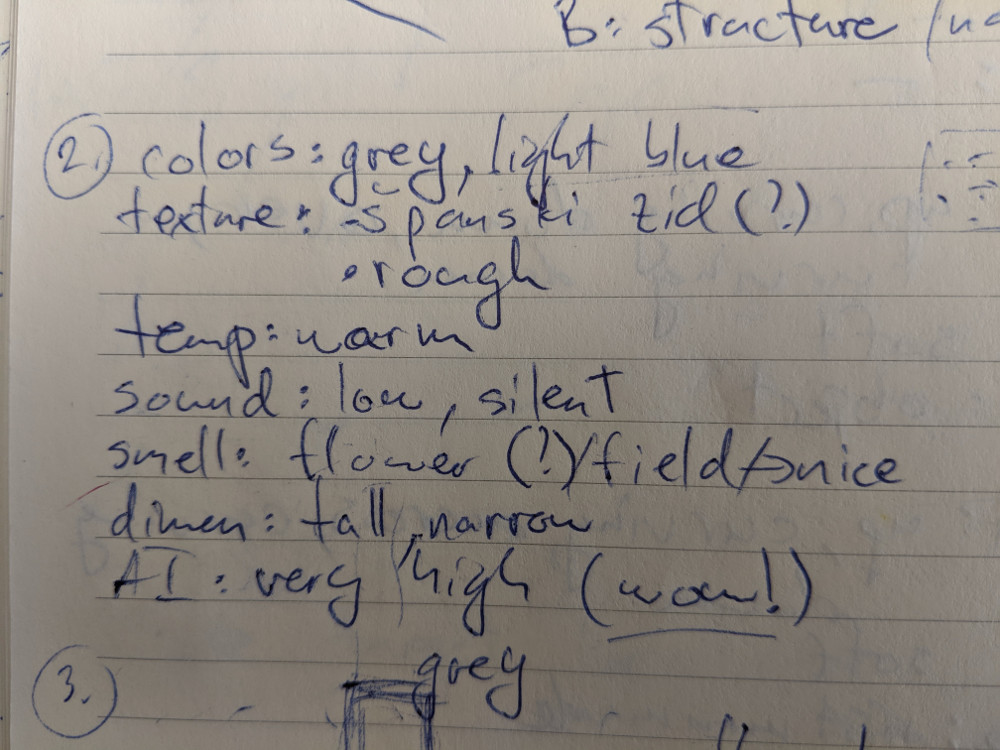
This is a setup for Stage 3, where you will sketch the target!
6 / 7
Stage 3
In Stage 3 you will sketch the target.
During Stage 2, there might be some images or dimensions appearing. Start sketching them. More images may appear that way. Just continue.
Draw what you “feel” is correct, not what you “think”.
If you don’t have anything to start with, try just feeling out the different parts of the paper with the pen. Try drawing very soft lines. Subconscious mind might give you more signals and control the hand and draw lines.
During Stage 3 you can move around the target! If you are done with the sketch, try saying to your mind to move closer to the target and start drawing. You can also move away from the target, or try to sketch it from another angle.
Stage 3 sketches from beginners usually don’t have much details. But as you improve, these sketches can be full of details!
Here is an example of Stage 3.
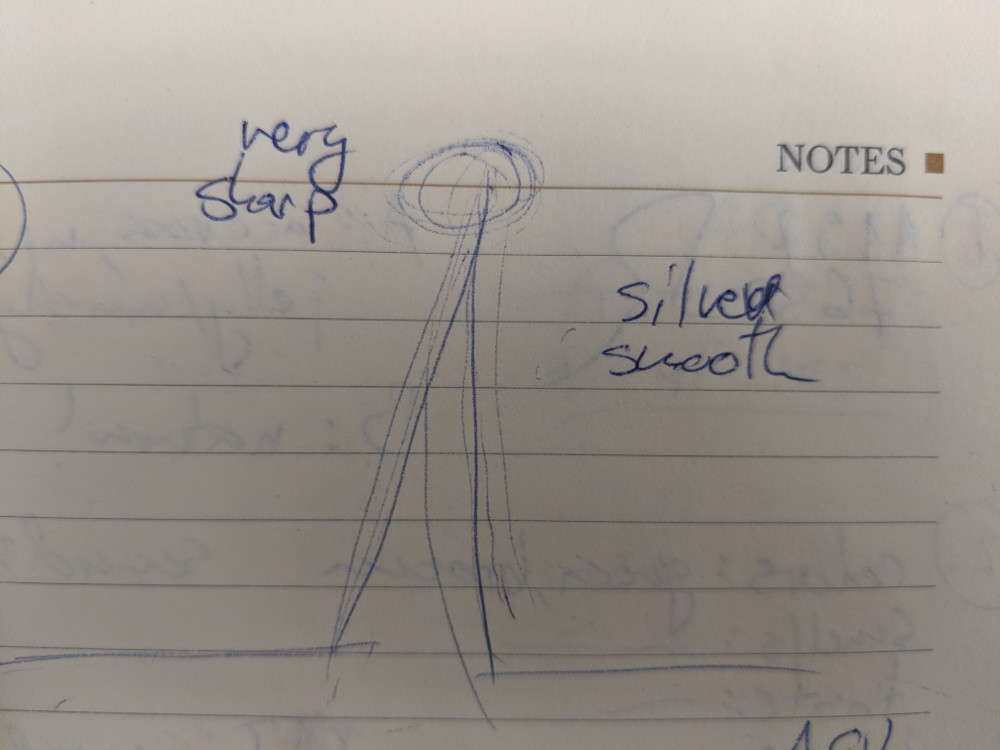
This is the last basic stage of CRV.
7 / 7
Feedback
After the session is complete, write down the session summary. Don’t try to identify the target, just note the raw perceptions.
As with any Remote Viewing technique, feedback is essential.
After writing the summary, you should see what the target actually is. That is your feedback.
That way you can compare your result with the actual target to see how correct you were and what you need to improve on.
As you can see, it is not possible to set up practice targets on your own, as you need to be blind to the target!
Don’t worry, we have you covered! Mind has a tool called “Practice Targets”. Each target is different and you can save all your Remote Viewing session and see detailed stats about different perceptions.

Practice it in the app
Mind turns what you just read into a daily practice: reminders, practice tools and a journal that shows your progress.


Practice it
Questions about Controlled Remote Viewing
How long is the Controlled Remote Viewing lesson?
About 35 minutes of reading in all, in short parts of about five minutes. Read one a day, or go at your own pace in the Mind app.
Is the Controlled Remote Viewing lesson free?
Yes. All of it is free to read on this page and free in the Mind app, which adds practice tools and tracks your progress.
Do I need experience before starting the Controlled Remote Viewing lesson?
No. It starts from the basics and builds step by step, so you can begin today whether you are new to the topic or not.